> For the complete documentation index, see [llms.txt](https://manual.seara.biz/llms.txt). Markdown versions of documentation pages are available by appending `.md` to page URLs; this page is available as [Markdown](https://manual.seara.biz/site-management/pms/pms-logs.md).
# PMS Logs
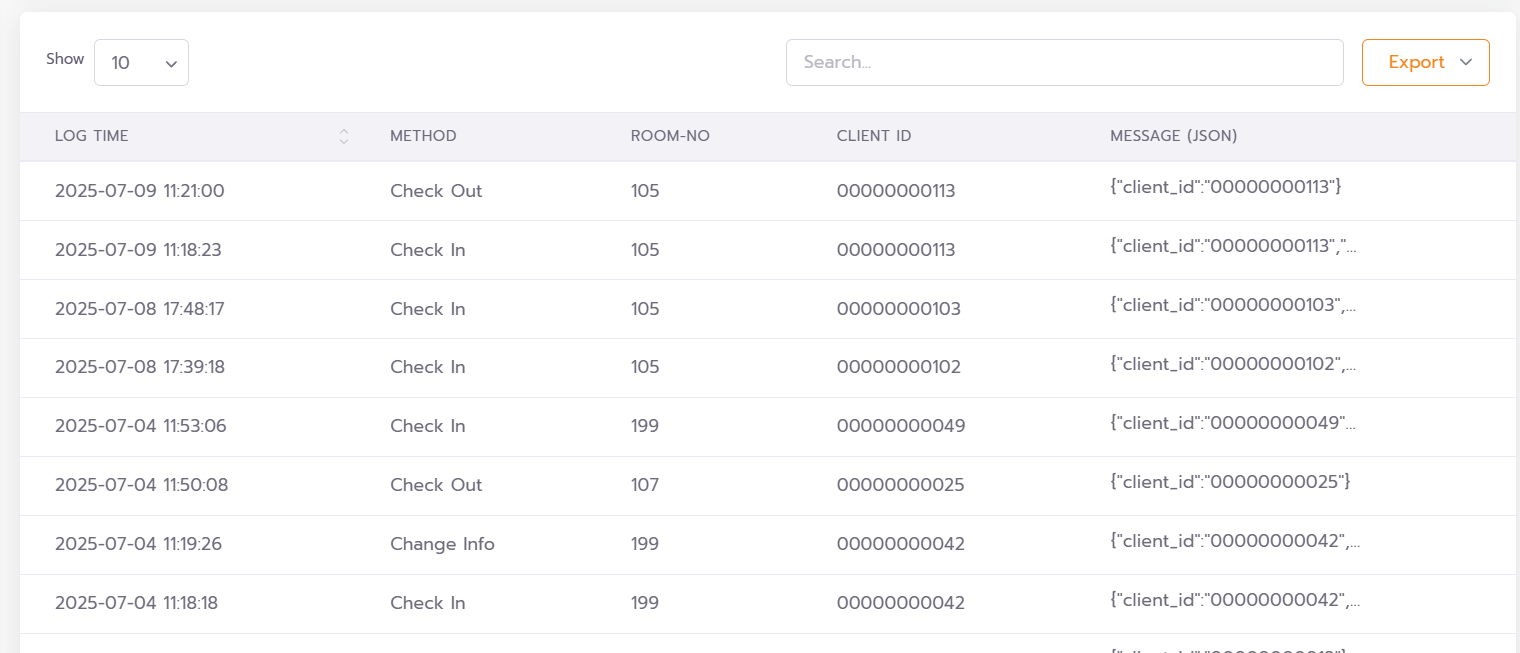
PMS Log คือประวัติการรับส่งข้อมูลจากระบบ PMS โดยจะบันทึกเหตุการณ์ต่าง ๆ เช่น การ Check-in, Check-out และข้อมูลอื่น ๆ ที่ส่งเข้ามาจาก PMS เพื่อใช้ในการตรวจสอบและติดตามย้อนหลัง
**Filters**
**Date Range:** เลือกช่วงวันที่ที่ต้องการแสดงข้อมูล Log
**Method:** เลือกประเภทของ Log ที่ต้องการ
 #### **รายละเอียดของข้อมูล Log ที่แสดงผล**
* **Show**: กำหนดจำนวนรายการ Log ที่ต้องการแสดงในแต่ละหน้า
* **Search**: ช่องสำหรับค้นหาข้อมูลภายใน Log เช่น หมายเลขห้อง (Room Number) หรือคำค้นอื่น ๆ ที่เกี่ยวข้อง
* **Export**: ใช้สำหรับดาวน์โหลดข้อมูล Log ออกมาในรูปแบบไฟล์ เช่น `.xlsx` หรือ `.csv`
* **LOG TIME**: วันที่และเวลาที่ระบบได้รับข้อมูลจาก PMS
* **METHOD**: ประเภทของกิจกรรม (Activity) ที่ส่งมาจาก PMS เช่น Check-in, Check-out เป็นต้น
* **ROOM-NO**: หมายเลขห้องของผู้ใช้งาน
* **CLIENT ID**: รหัสประจำตัว (Client ID) ที่ส่งมาจากระบบ PMS เพื่อระบุตัวตนของผู้ใช้งานหรืออุปกรณ์
* **MESSAGE**: ข้อความหรือข้อมูลที่ระบบ PMS ส่งเข้ามา พร้อมรายละเอียดเพิ่มเติมในแต่ละกิจกรรม
#### **รายละเอียดของข้อมูล Log ที่แสดงผล**
* **Show**: กำหนดจำนวนรายการ Log ที่ต้องการแสดงในแต่ละหน้า
* **Search**: ช่องสำหรับค้นหาข้อมูลภายใน Log เช่น หมายเลขห้อง (Room Number) หรือคำค้นอื่น ๆ ที่เกี่ยวข้อง
* **Export**: ใช้สำหรับดาวน์โหลดข้อมูล Log ออกมาในรูปแบบไฟล์ เช่น `.xlsx` หรือ `.csv`
* **LOG TIME**: วันที่และเวลาที่ระบบได้รับข้อมูลจาก PMS
* **METHOD**: ประเภทของกิจกรรม (Activity) ที่ส่งมาจาก PMS เช่น Check-in, Check-out เป็นต้น
* **ROOM-NO**: หมายเลขห้องของผู้ใช้งาน
* **CLIENT ID**: รหัสประจำตัว (Client ID) ที่ส่งมาจากระบบ PMS เพื่อระบุตัวตนของผู้ใช้งานหรืออุปกรณ์
* **MESSAGE**: ข้อความหรือข้อมูลที่ระบบ PMS ส่งเข้ามา พร้อมรายละเอียดเพิ่มเติมในแต่ละกิจกรรม